QR Code Menu Design: 4 Free Themes for Restaurants and Cafés
- Written by
- Ala Baganne
- Published on
- Nov 11, 2026
- Read time
- 6 min
- Category
- Guides
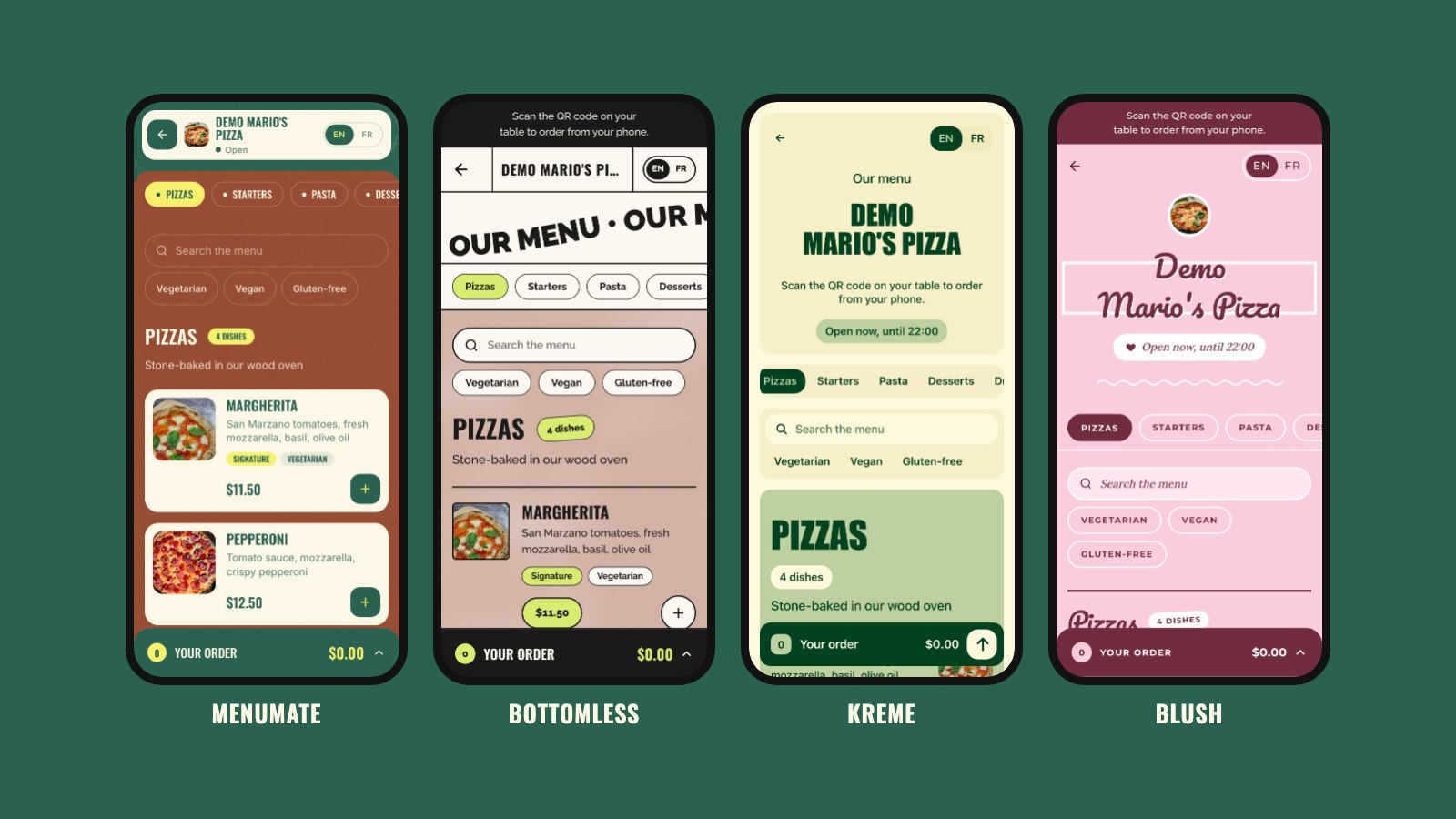
See four free digital menu designs on a real phone, using our Mario's Pizza demo. Pick the look that fits your restaurant or café and switch it any time.
Short answer: when you create a digital menu with MenuMate, you pick how it looks from a set of free themes. Guests scan the QR code on their table and see your menu in that design, right in their phone's browser. Your dishes, prices, photos and table QR codes stay the same in every theme, so you can change the look whenever you like.
To show you the difference, we put the same restaurant in each theme: Mario's Pizza, our demo pizzeria, with the same 16 dishes and the same photos. Every screenshot below was taken on a phone-sized screen.
Why the design of your QR code menu matters
Most guests will read your menu on a phone, often with one hand, in a busy room. A good design helps them in three ways:
- They find dishes faster. Clear sections, big names and prices that stand out mean less scrolling and fewer questions for your staff.
- They see your brand. The menu is part of the table, like your plates and your chairs. A pizzeria, a coffee shop and a dessert bar should not all look the same.
- They order with confidence. When photos, tags and prices are easy to read, guests know what they are getting before they press "Place order".
What every theme includes
Changing the theme changes the look, not the features. Whichever design you pick, guests get:
- Your menu sections as tabs that stay at the top while they scroll
- A search box and filters for vegetarian, vegan and gluten-free dishes
- Your dish photos, descriptions, prices in your currency, and tags such as "Signature" or "Spicy"
- "Open now" or "Closed now", based on your service hours
- Buttons in English or French
- Ordering from the table: guests add dishes, send the order, and it reaches your dashboard with the table number
- No app to install: the menu opens in the phone's browser
And it is all free: no plan, no card, no fee on orders.
1. MenuMate: deep green and rust
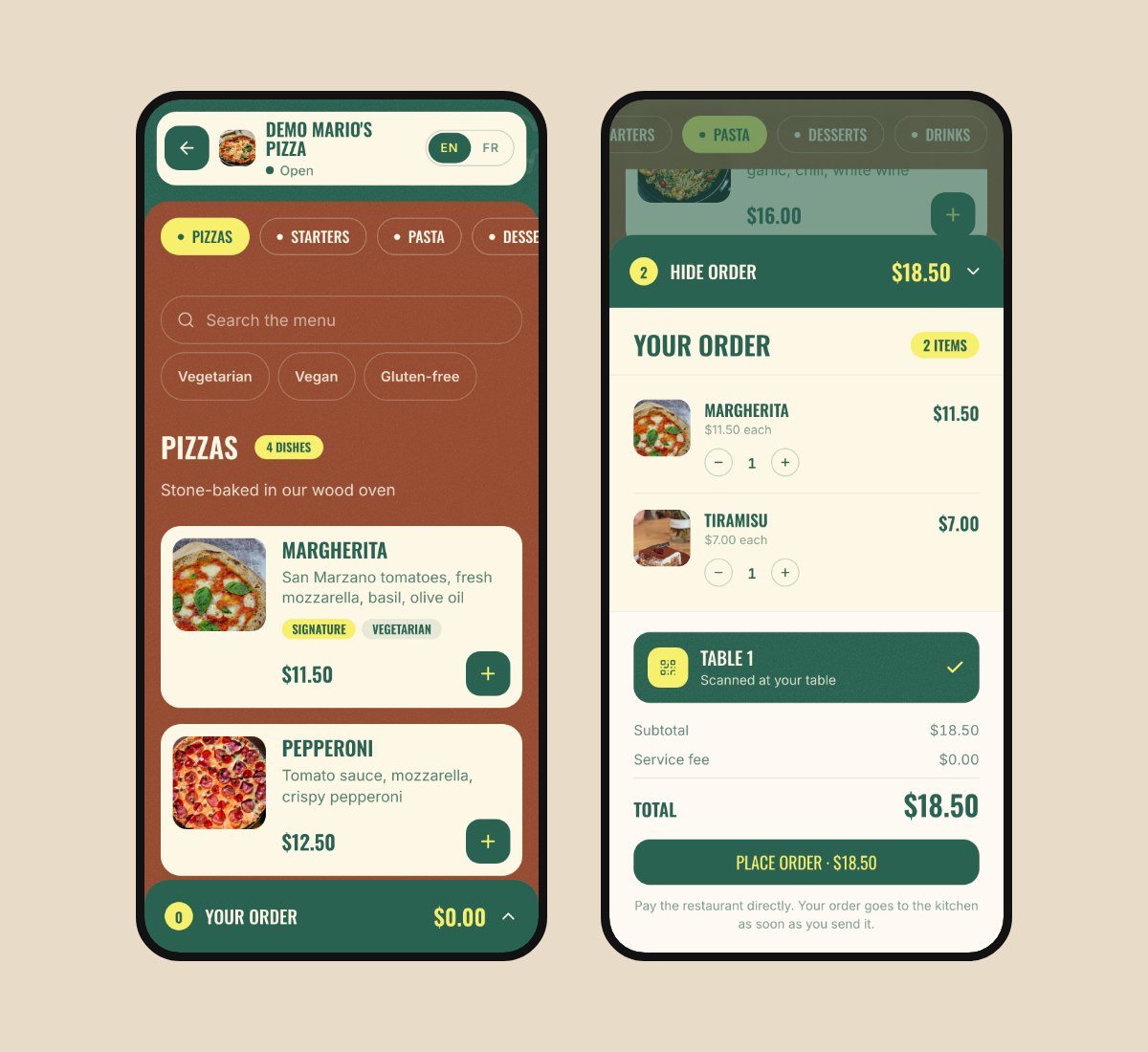
The MenuMate look: deep green and rust, big condensed headings and small stickers. Each dish sits on a cream card with its photo, its tags and a green "+" button. Your logo, name and open status stay in a bar at the top.
Good for: pizzerias, burger places, casual restaurants and anyone who wants a bold, warm menu.
Open Mario's Pizza in the MenuMate theme
2. Bottomless: a printed café poster
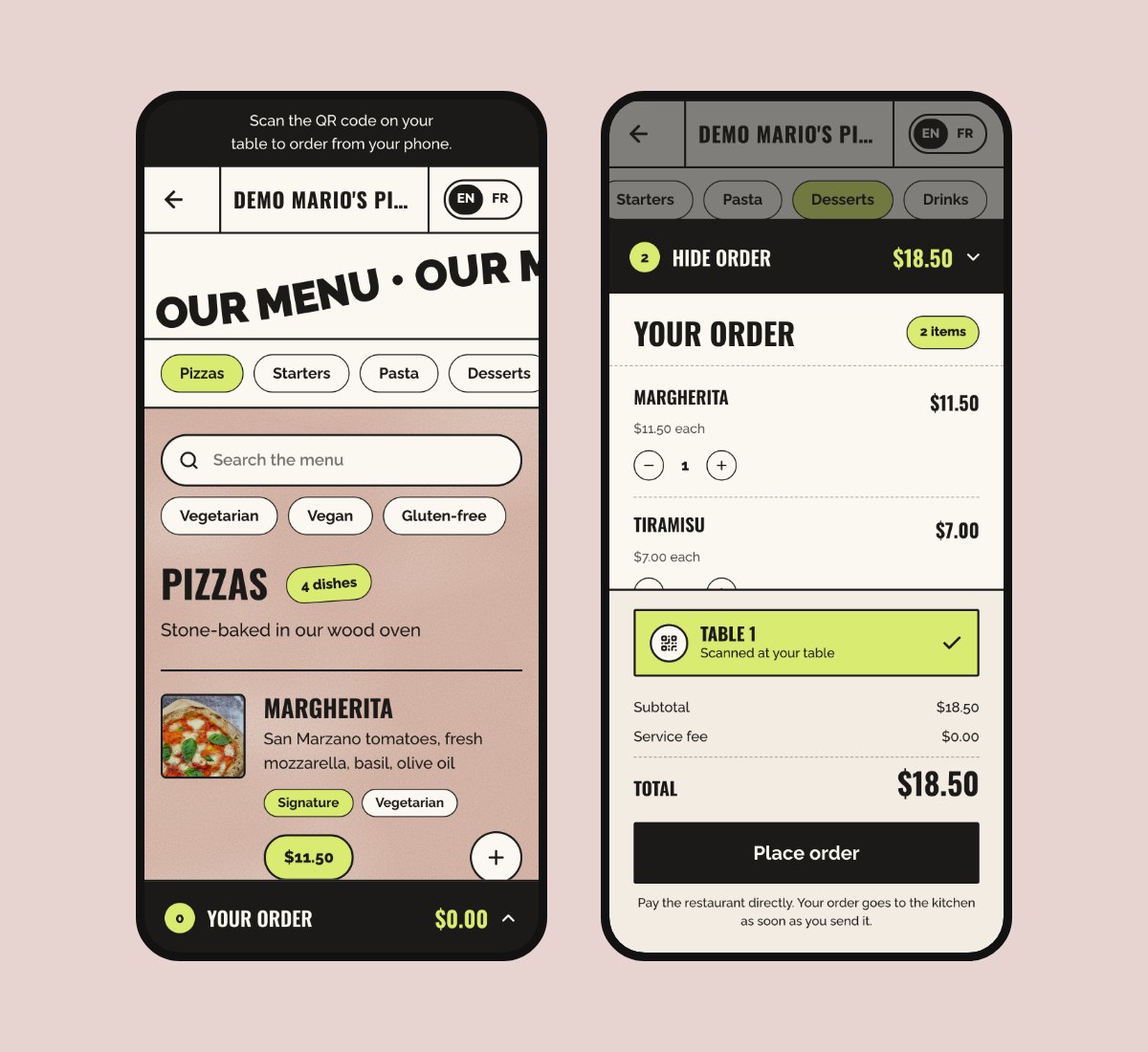
Bottomless looks like a poster on a café wall: cream paper, thick ink outlines, a dusty rose menu and lime green price tags. A wavy "Our menu" title under the header slides along as guests scroll.
Good for: coffee shops, brunch places, bars and young brands with a playful style.
Open Mario's Pizza in the Bottomless theme
3. Kreme: a calm neighborhood café
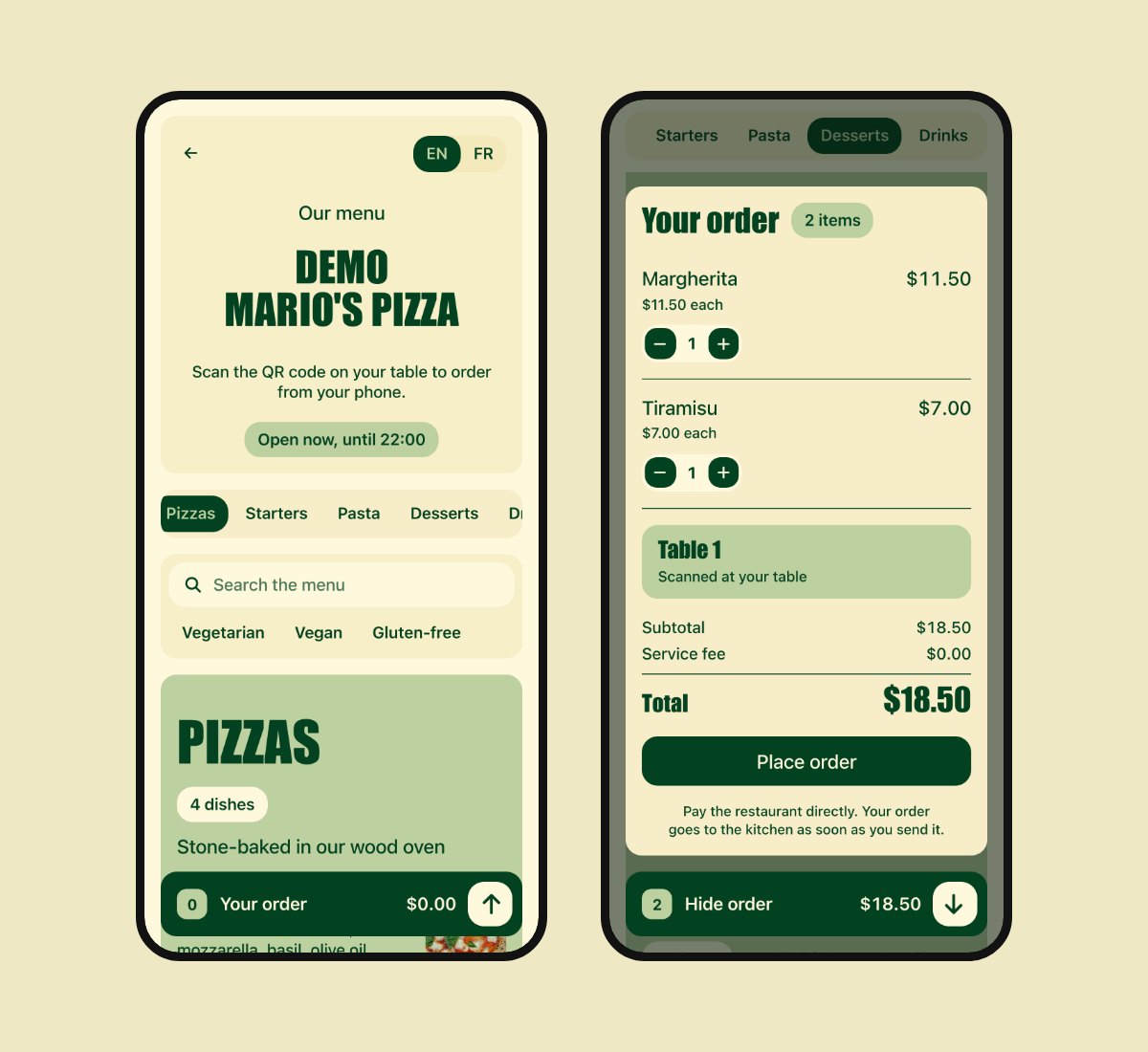
Kreme keeps things simple: cream paper, one deep forest green and giant capitals. Each section of the menu sits in its own rounded box, so a long menu still feels tidy.
Good for: cafés, bakeries, juice bars and small restaurants that want a clean, friendly look.
Open Mario's Pizza in the Kreme theme
4. Blush: soft and sweet
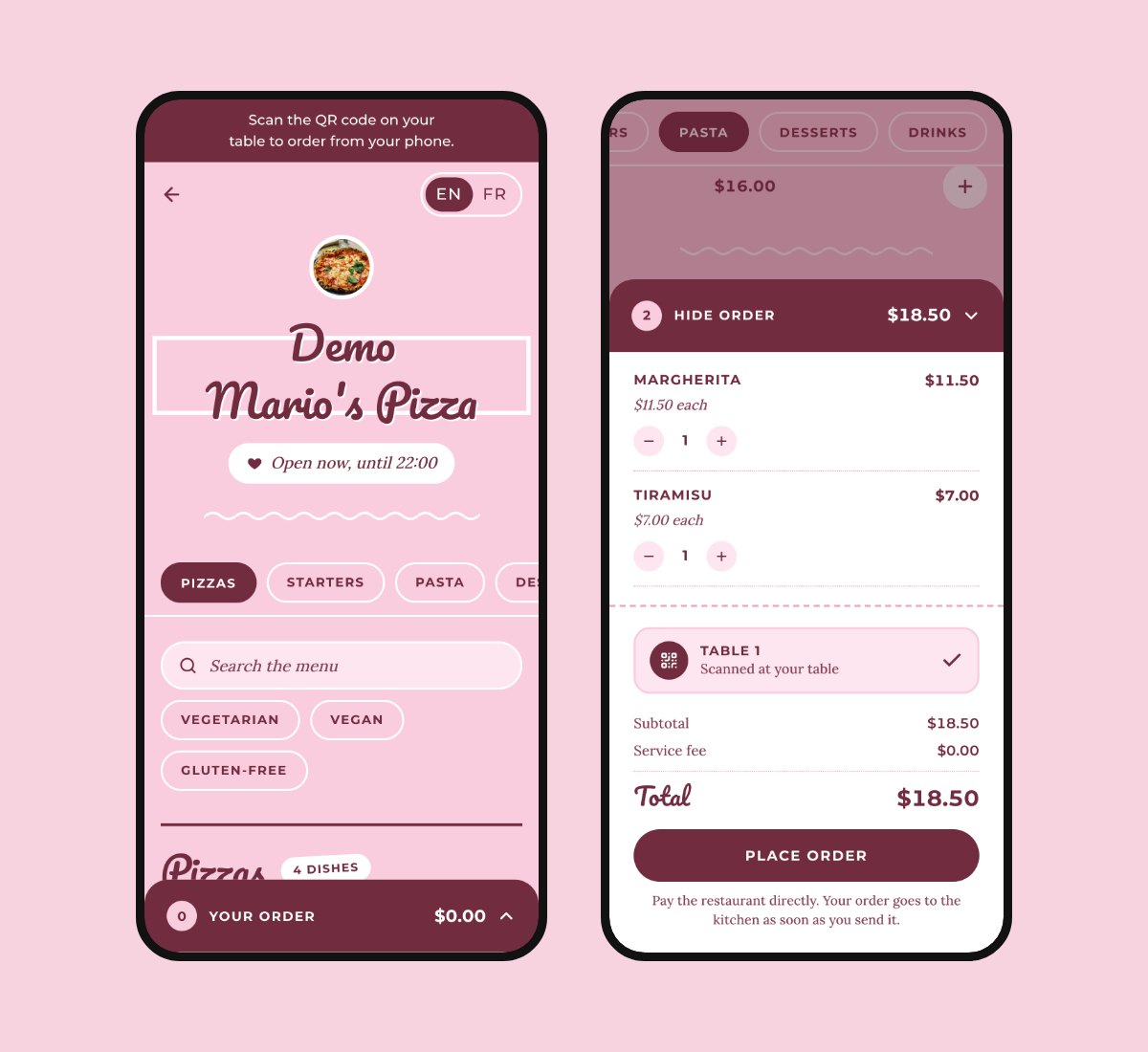
Blush is candy pink paper with wine red script titles and white frames, like a sweet printed café menu. Dish photos are round and section titles are written in script.
Good for: dessert shops, pâtisseries, tea rooms and ice cream parlors.
Open Mario's Pizza in the Blush theme
New: Noir, for high-end restaurants
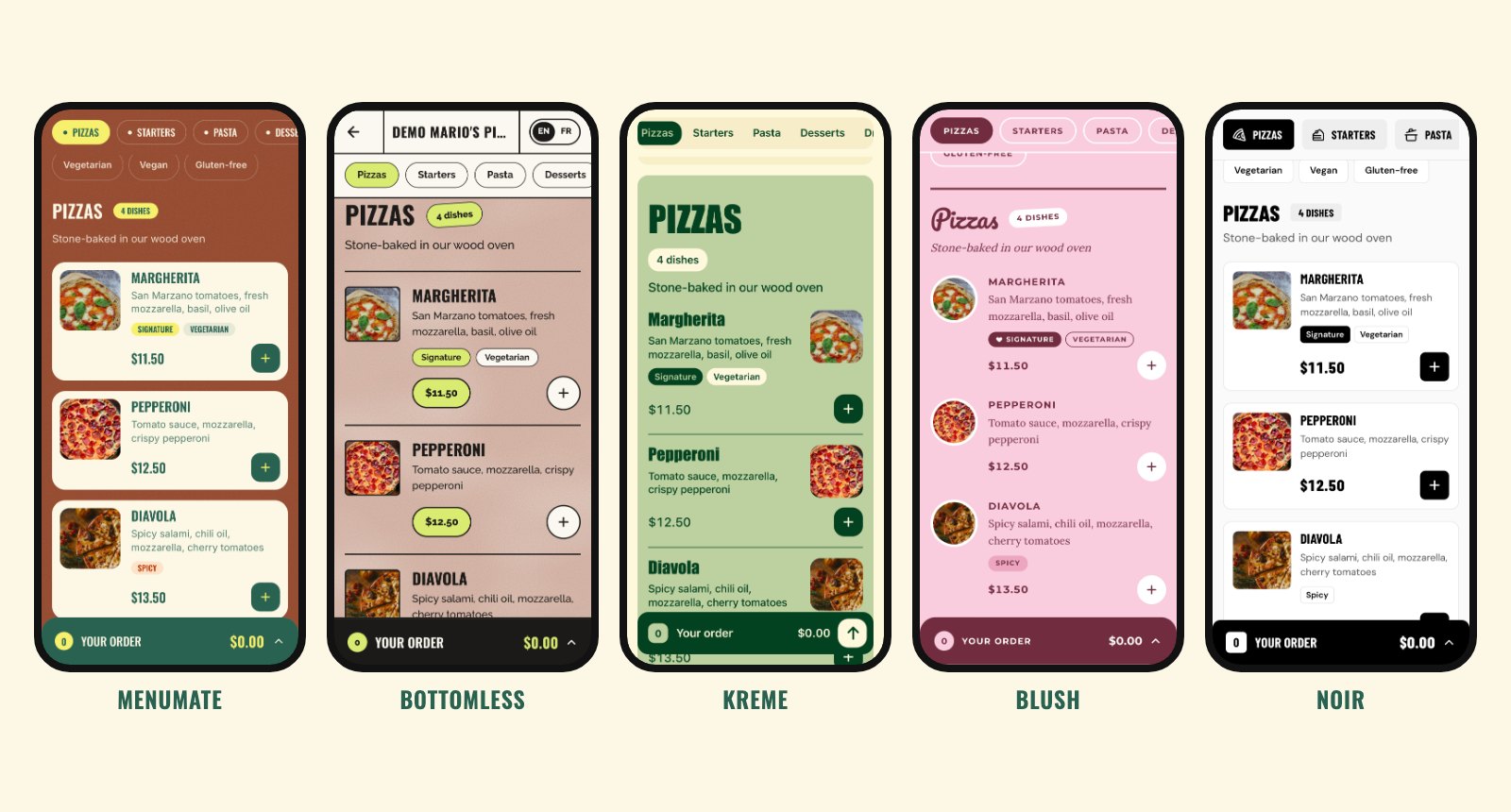
We just added a fifth theme. Noir is black and white, with your name in wide heavy capitals on a black banner and dishes on flat white cards. The only color on the page comes from your food photos. It is made for fine dining restaurants, wine bars and high-end cafés. Read the full tour of Noir.
Which theme should you pick?
| Theme | The feel | Good for |
|---|---|---|
| MenuMate | Bold green and rust, stickers | Pizzerias, burger places, casual restaurants |
| Bottomless | Café poster, ink outlines, lime price tags | Coffee shops, brunch, bars |
| Kreme | Calm cream and green, a box per section | Cafés, bakeries, small restaurants |
| Blush | Pink paper, script titles | Dessert shops, pâtisseries, tea rooms |
| Noir | Black and white, wide capitals | Fine dining, wine bars, high-end cafés |
Not sure? Pick the one closest to your sign, your walls or your packaging. You can switch later in a few seconds.
How to change the look of your menu
- Create your free MenuMate account and add your restaurant, or sign in.
- Open your restaurant in the dashboard and go to Theme.
- Tap a theme to see it on the phone preview.
- Save. Guests see the new look the next time they open your menu.
Your dishes, prices, photos and QR codes do not change, so there is nothing to print again.
Common questions
Can I create a digital menu for free?
Yes. MenuMate is free: no plan, no credit card and no fee on orders. Add your dishes, print your table QR codes and your menu is online. Our guide on how to create an online menu walks you through it step by step.
Do guests need an app to see the menu?
No. They point their phone camera at the QR code on the table and the menu opens in the browser.
Can guests order from the table?
Yes, in every theme. The order reaches your dashboard with the table number, and your staff move it from accepted to ready. MenuMate does not take payments, so guests pay you directly, the way they do today. Read more about QR code table ordering.
Will my menu work on a laptop or tablet too?
Yes. Every theme adapts to bigger screens, and on a laptop the order sits next to the menu.
Ready to try it? Open the Mario's Pizza demo, or make your own free QR code menu in a few minutes.